3-Step Custom AI Agent Development With TechMonk's Agent Builder
Key Highlights
Why Custom Agents: Personalised AI agents improve support speed, marketing relevance, scalability, learning, and cost efficiency.
E-commerce Impact: Real-time product discovery, conversational shopping, always-on support, and post-purchase engagement.
Builder Components: Tools, agents, and flows form the foundation of custom AI automation.
Tools Library: Text, API, code, RAG, and forms powering flexible, task-ready AI agents.
Agentic Workflows: Orchestrated multi-agent systems executing end-to-end e-commerce operations without code.
Are your customers expecting more than basic online shopping?
Today, e-commerce is not just about listing products. Customers want fast help, smart support, and smooth experiences across channels. To meet this demand, businesses are turning to AI agents. These agents answer questions, manage orders, and capture leads with ease.
Here are a few clear shifts to note:
- Customers expect AI-driven support
- Speed and accuracy matter more than ever
This is where TechMonk steps in. Its Agent Builder helps create task-focused AI agents without any coding. These agents handle real business tasks using connected tools.
This blog walks you through three simple steps of custom AI agent development using TechMonk and shows how to build agents that fit your business needs.
Why Build Your Own Personalised AI Agent for E-commerce?
If you're thinking about AI agent adoption, now is the time. Building a custom AI agent that fits your e-commerce goals can improve customer experiences, make your team more efficient, and help your business grow.
1. Faster Customer Support
A personalised AI agent can handle common tasks like answering FAQs and updating shipping info. This frees up your team to focus on bigger priorities, while customers get quick, accurate help. It's a simple way to boost AI in customer service.
2. Smarter Marketing With Real Data
Your AI agent can look at customer behaviour, past purchases, and preferences to help you send better offers. This data-driven approach makes your marketing more personal and helps improve engagement and conversions.
3. Lower Costs, Better Service
AI agents take away the need for large support teams by automating repetitive tasks. This makes it easier and more affordable to give great service, especially for small and medium businesses starting with AI agents for e-commerce.
4. Easy to Scale as You Grow
As your business grows, your AI agent grows with it. It can manage more conversations without needing more people, so you stay efficient no matter how busy things get.
5. Gets Smarter Over Time
Custom AI agents learn from every interaction. The more they're used, the better they understand your customers. That means more accurate answers, helpful suggestions, and an overall better shopping experience.
Want to scale smarter? Let TechMonk help you create the right AI agent.
Book a DemoHow AI Agents Work for E-commerce Businesses
AI agents for e-commerce solutions are changing the way businesses run. They take care of tasks that used to need constant human effort. With no-code tools, you can quickly set up custom AI agents for businesses and improve your daily operations. Here's how they help:
- Smarter Product Discovery and Suggestions: AI agents learn from browsing behavior, past purchases, and preferences to suggest the right products. This makes shopping easier and more personal. It also helps boost your average order value and drive more sales.
- AI Support That's Always Ready: Why are AI agents essential for customer service? Because they're available 24/7, never take a break, and handle a wide range of questions. They resolve issues fast, and when needed, pass things on to your human support team.
- Real-Time, Conversational Shopping: Customers can chat with your AI agent in real time, ask questions, get product tips, and complete a purchase, all in the same place. This smooth, interactive experience reduces friction and helps turn browsers into buyers.
- Support That Continues After the Sale: With AI agent adoption for customer service enhancement, post-purchase care becomes easy. AI agents send order updates, follow up on abandoned carts, and offer personalised help automatically.
How to Build An AI Agent With TechMonk's AI Agent Builder Tool
Before we explore how to build an AI agent with TechMonk, let us understand the three components of TechMonk's AI Agent Builder.
- Tools Library
- Agent Library
- Agent Flow
The Tool Library: Tools That Power Your AI Agents
The Tool Library is a collection of powerful tools designed to streamline different functions in your e-commerce business. Want to talk to customers, check your data, or connect with other services? TechMonk has a tool for each of these tasks.
But if you want a custom tool that performs a unique function, you can still build it with TechMonk.
Types of Tools in the Library
TechMonk provides a diverse set of prebuilt tools to help you handle a variety of tasks. Each tool within the library serves a unique purpose and can be customised further to meet specific business requirements.
And it also allows you to build different types of custom tools to build your own tool set that you can power your AI Agents with:
- Text: The text tool is a straightforward utility that may integrate AI, but fundamentally, it functions as a simple wrapper for text. This tool is used for tasks like providing user-friendly greetings or responding to text-based interactions.
- API: API tools are designed to interact with external APIs. These tools leverage external services to perform specific actions. For instance, retrieving loyalty points from a system would involve calling an API that provides the relevant data.
- Code: The code option allows for the execution of custom code. Users can write and modify code according to their requirements, providing complete flexibility to design and implement specific tasks within the tool.
- RAG: The RAG (Retrieval-Augmented Generation) tool enables the upload of vector-based documents. This tool is ideal for knowledge retrieval and searching through uploaded content.
- Form: The form tool is designed to capture specific data points and manage updates. It is especially useful for collecting information, such as generating leads.

In-Built Tools
These are ready-to-use tools already built into TechMonk's Agent Builder. They help power the AI agents that come pre-built in your system. You can also use these built-in tools to create new AI agents that fit your business needs.
Here are some examples of pre-built tools in TechMonk's library.
| Tool Name | Type | Description |
|---|---|---|
| About Company Agent | RAG | This tool is perfect when users need detailed information from documents like company terms, policies, or instructions. |
| Get Details | Text | This tool helps e-commerce businesses when they do not know the customer yet and do not have the order number. It is used to ask the user with which details they wish to proceed. |
| Confirm Order | API | This agent helps e-commerce customers to cancel an order or confirm the cancellation of an order they placed. |
| Capture Lead Details | Form | This agent assists in collecting user information to generate potential business opportunities. |
| Get Product Name | Code | This tool is useful when the user mentions a product in their message and you want to get the exact product name. It gets the list of product names and their IDs from the database. |
Custom Tools
The custom tools section shows all the AI agents you've created within TechMonk's system. When you build new AI agents, you can see it being listed here. Merchants can create tools of any type, including Form, RAG, Code, or Text.
Agent Library: AI Agents to Streamline Every Workflow
TechMonk lets you create agents using the tools in the system. You can build these AI agents to handle specific tasks and workflows. In addition, you can create custom AI solutions from the agent library for any purpose.

In-Built Agents
Here are some examples of TechMonk's pre-built agents:
- About Company Agent: This agent is used for any queries related to the company. It gives responses based on company information like contact details and general questions.
- Bot Challenge Agent: This agent is made for casual chats. It can answer questions like "Who are you?" or handle simple greetings and farewells.
- Lead Generation Agent: This agent is focused on capturing leads. It helps collect user details to create business opportunities.
- Order Management Agent: This agent looks after anything related to orders. It helps users track, cancel, and view past orders.
Custom Agents
TechMonk allows e-commerce businesses to create custom AI agents tailored to specific needs. For example, one such custom agent our users built is the loyalty program agent. This agent is dedicated solely to handling inquiries related to the loyalty program.
Each agent has its tools; you can integrate custom tools as needed. If you wish to enhance an agent's capabilities, you can add new tools anytime. These tools can be connected to your existing software systems by wrapping them in an API, extending the agent's functionality.
Agent Flow
TechMonk's Agent Flow is a system comprising multiple AI agents designed to run specific workflows within a business. For example, when a user interacts through a chatbot or sends an email, Agent Flow can trigger the correct set of agents to complete the requested task or action.
When creating any workflow, you can incorporate AI Agents to manage different functions within that flow. For instance, in an e-commerce flow, specific agents correspond to various tasks, such as Ticket Management, Product Management, Product Purchase, and others.
You also have the option to create custom AI agents, such as a Loyalty Manager agent, which can be added to your existing e-commerce flow. Custom AI agents can be incorporated into any flow, offering flexibility in the design and functionality of your workflows.
When a request is made, the orchestrator, the central processing component of the agent system, determines which agent or set of agents is most suited to handle the task. The orchestrator selects the appropriate agent and can even use multiple agents in sequence to fulfil the request.
If a user poses several questions, the orchestrator ensures that the relevant agents respond accordingly. This flexibility allows you to evolve and customise workflows to meet changing requirements.
TechMonk's AI sales agents and AI support agents represent prebuilt workflows. These are dedicated flows to automated e-commerce sales and support operations.
Orchestrate AI agents to work together in one continuous, automated workflow.
Try Agent Builder3-Step Custom AI Agent Development With TechMonk

Step 1: Building Custom Tools From The Tool Library
1. From the left sidebar of TechMonk, select Agent Builder and launch the Tool Library.

2. Open the Custom Tools section and select the Create New Tool button.

3. On the pop-up screen, enter the name and description of the tool. Also, choose the Input channel and type of tool you wish to build.

4. Select the Next button at the bottom of the pop-up.
5. On the next screen, select the required Dataset for your tool and choose whether you prefer response formatting.

6. On the next screen, enter the button details, add new buttons, and enter the necessary requirements.

7. Finally, add more buttons, enter the button details in the respective fields and click Done to save the tool.

Step 2: Building Custom AI Agents From The Agent Library
8. From TechMonk's Agent Builder open Agent Library.
9. Open Custom Agents and select the Create New Agent button.

10. You can see a pop-up on your screen. In this window, enter the agent's desired Name, Description, and Output.

11. Next, choose the pre-built and custom tools from the Tools library to empower your AI agent. Finally, click on Done to save your AI Agent.

Step 3: Creating An Agentic Workflow
12. From the Agent Builder, choose Agent Flow.
13. Type in the Name, Description, and Input Channels for your agentic workflow. Once you've done this, select the Next button at the bottom of the screen.

14. Select the AI agents for your workflow from the screen and click Next. You can also use the search bar to find any AI agent.

15. You can also choose customised tools depending on the tasks you want your agents to perform. Once done, select the Next button from the bottom of your screen.

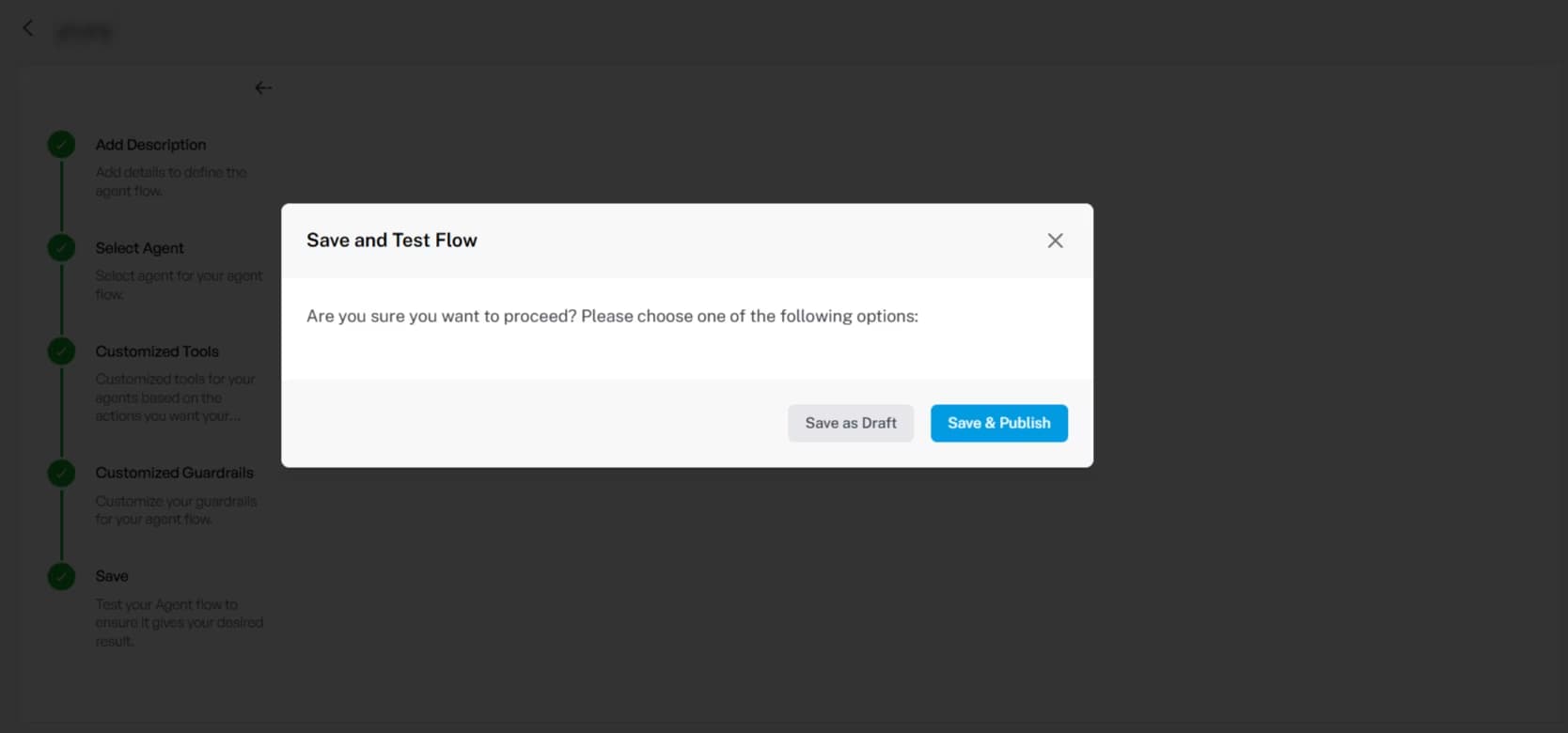
16. Select the Save as Draft or Save & Publish option as needed.

17. Add In-built and Custom Guardrails for your workflows.
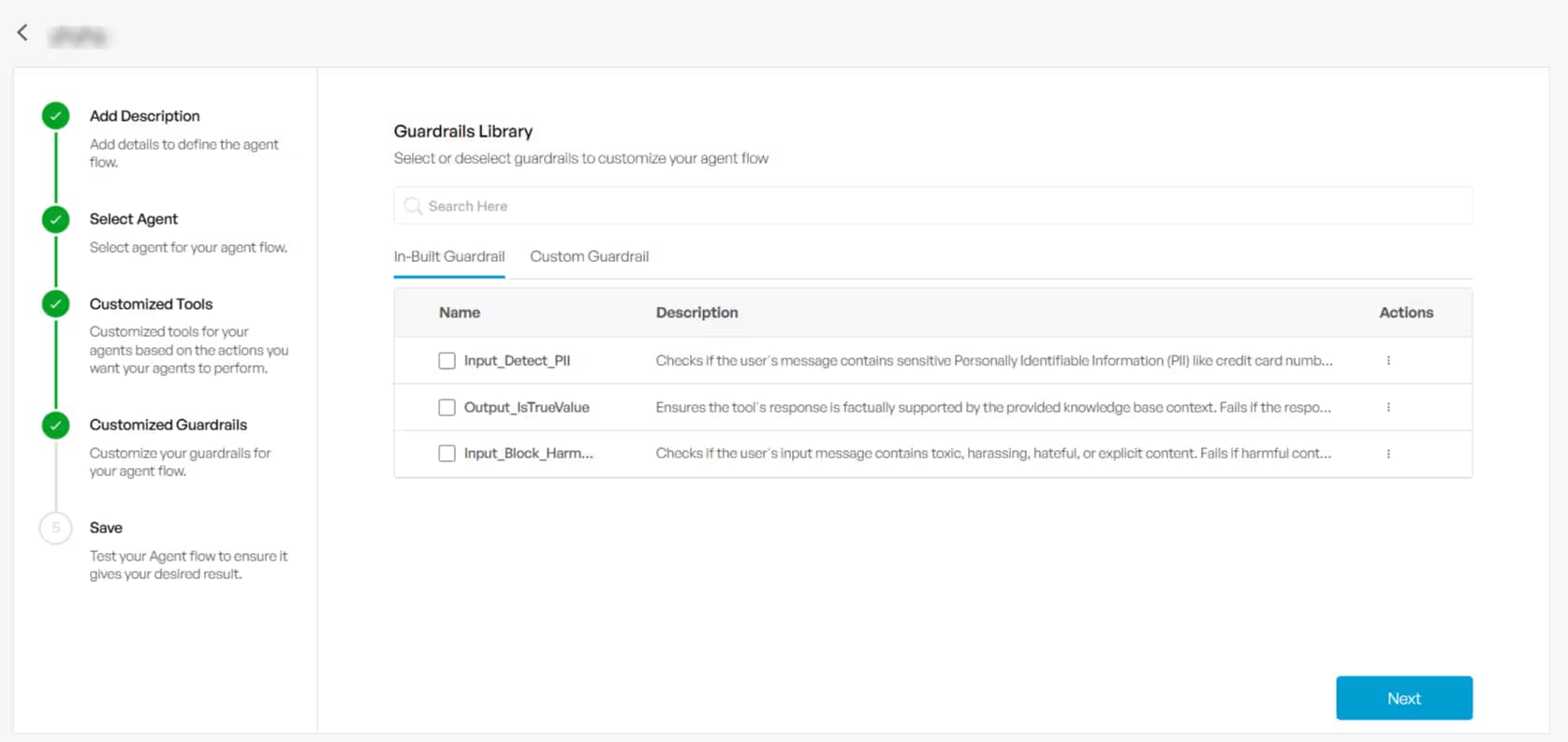
18. Finally, select the Save as Draft or Save & Publish option as needed.
Offer Unified Customer Experience Across Channels With TechMonk's AI Agents
You may wonder what AI capital really means. AI capital refers to a group of smart AI agents and software that work together to improve operations and customer experience. As systems grow more complex, how do you keep everything aligned and useful?
How TechMonk Keeps Your AI Agents Just the Way You Want
TechMonk equips your AI agents with capabilities that help you keep them secure, dependable, and improving over time. You maintain full control as your system scales with clarity and confidence.
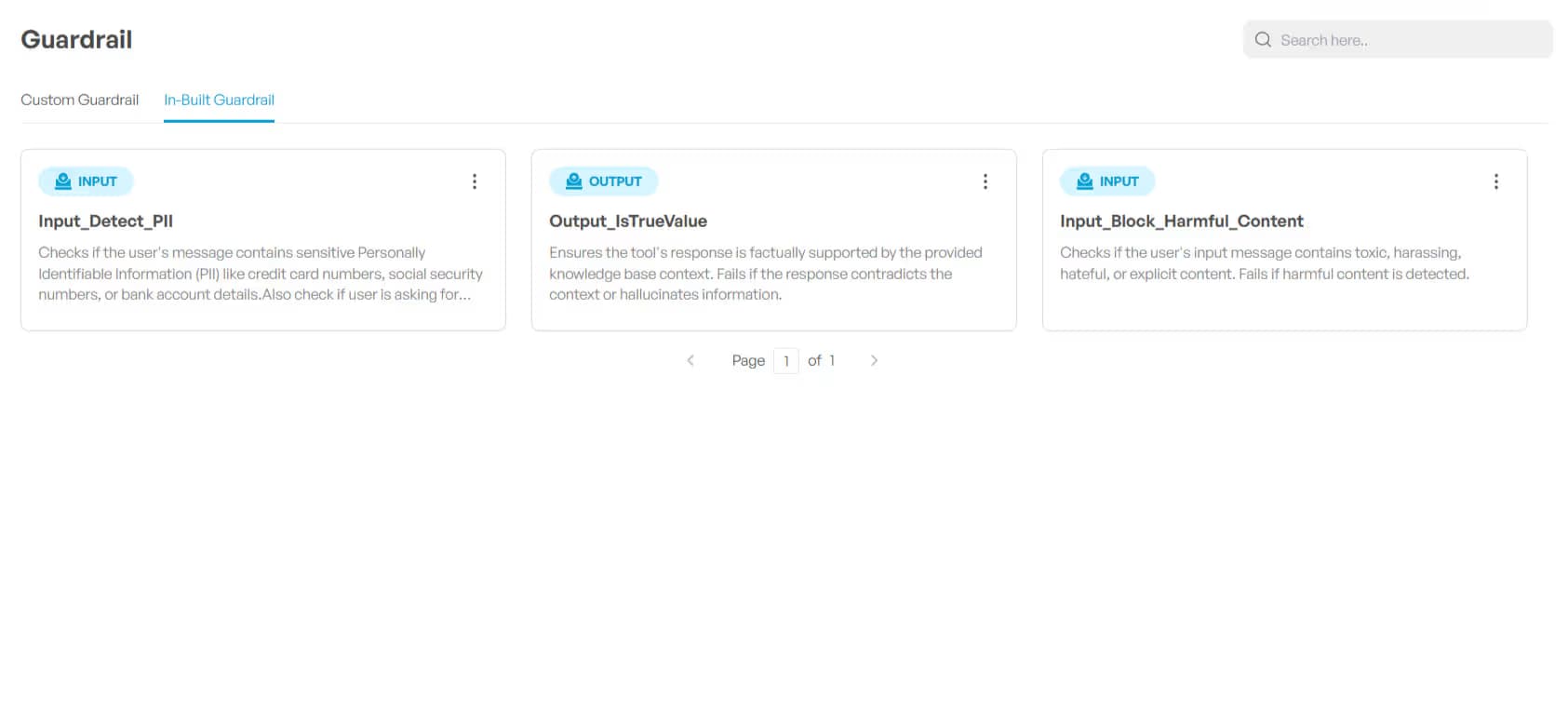
- Strict Guardrails: You set clear input and output rules so the system processes only valid requests. This keeps responses precise and reduces misuse.
- Testing Automation: You use an LLM Judge to train and check AI agent responses on an ongoing basis. This helps ensure users receive accurate and relevant answers every time.
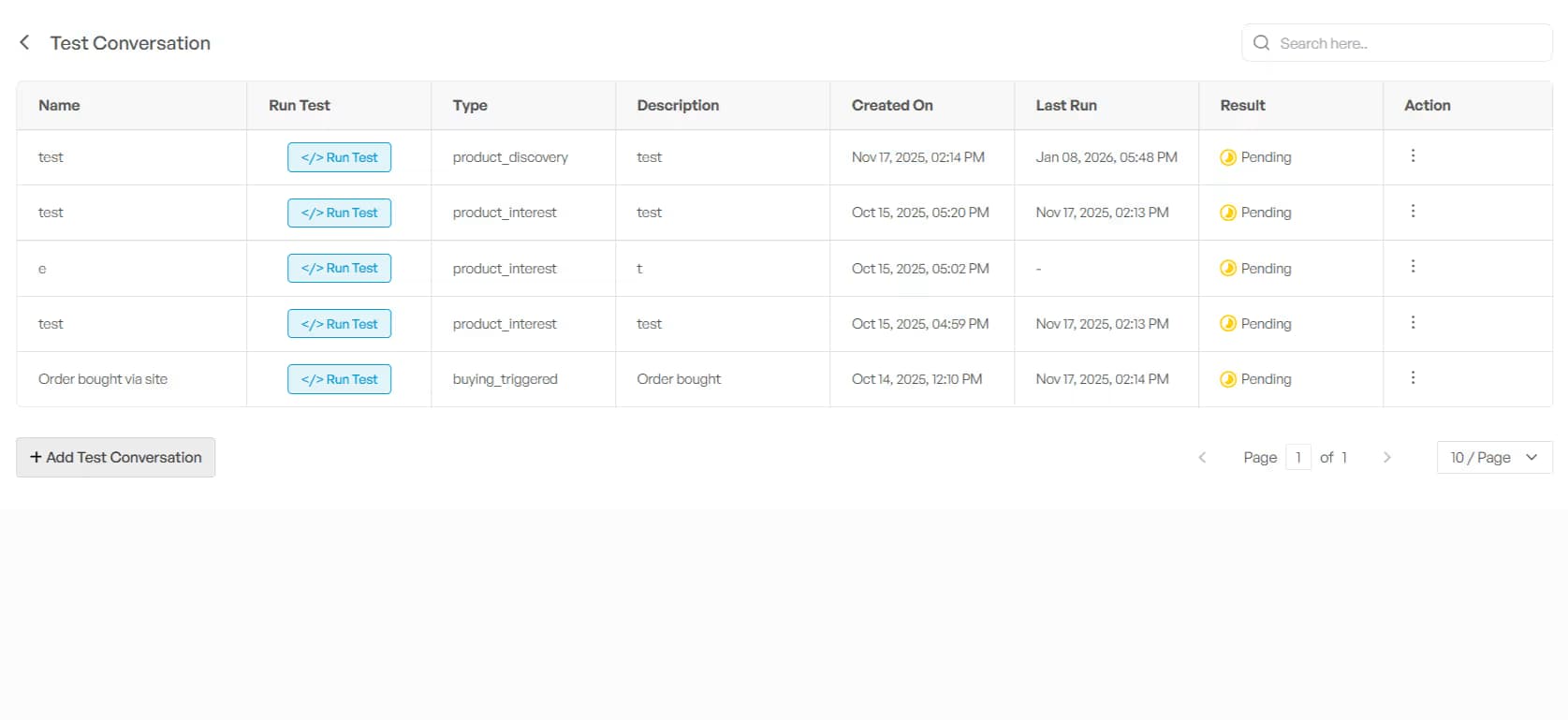
- Observability of Workflows: You track AI agents as they handle customer queries in real time. This visibility helps you identify issues early and refine interactions without delay.
- Traceability of Conversations: You follow AI agent conversations across multiple channels to see how responses develop. This understanding helps you spot gaps and keep communication consistent across touchpoints.
- Tracking AI Agent Performance: You measure reasoning, response times, and latency to get clear insights. Use this data to continuously improve efficiency and results.
Conclusion
We have discussed how to build custom AI agents using TechMonk. We walked through three simple steps: creating tools from the Tool Library, building AI agents from the Agent Library, and setting up workflows using Agent Flow.
TechMonk makes the entire process easy. You do not need to code or have any technical skills. You can create powerful AI agents that handle tasks like answering customer questions, managing orders, and collecting leads—all in just a few clicks.
If you want to save time and make your business smarter, try TechMonk's AI Agent Builder today. It is simple, flexible, and built to grow with your needs.
Skip the dev work. Build custom AI agents with an easy no-code interface.
Book demoFrequently Asked Questions
Have another question? Please contact our team!
Yes, you can. With TechMonk, creating your own custom AI agents for businesses is easier than ever. You can design an agent that fits your sales, support, or marketing needs without writing any code. These agents can take care of repetitive tasks, offer personalised recommendations, and even handle post-purchase support.